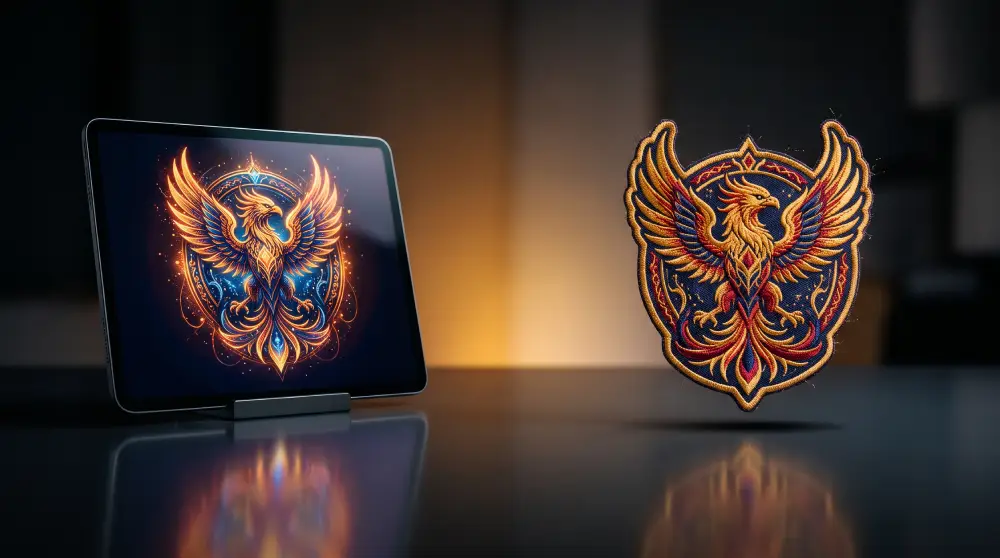
An AI patch design is artwork generated by a tool like ChatGPT, Gemini, or Midjourney and intended for a patch. These tools output flat pixel images, while embroidery machines need stitch instructions. The gap between the two is why most AI designs need simplifying before they can be made.
You typed a prompt, got back something that looked perfect, and sent it to a patch maker. Then came the email asking you to simplify it.
That email is not a sales tactic. An AI patch design and an embroidered patch are built on completely different rules, and most of what makes a generated design look good on screen is exactly what breaks it on fabric. Here is what happens, and what you can do about it.
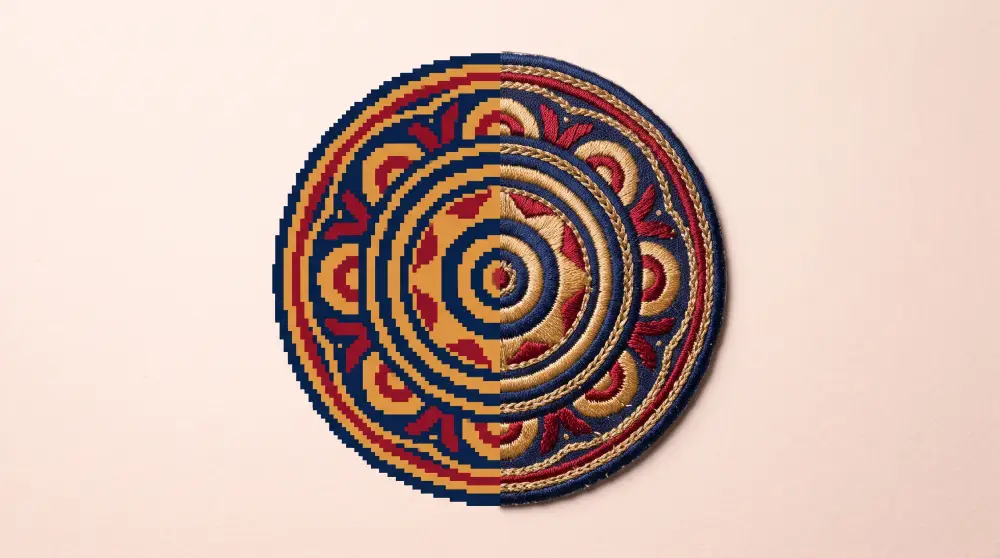
An image is a picture. A patch is a set of instructions.
This is the part that explains everything else.
An AI image is made of pixels, millions of tiny colored squares arranged in a grid. Designers call this a raster file. The other kind, a vector file, stores shapes as mathematical paths instead of squares, which is why it can be scaled to any size without going blurry.
Almost every AI image tool outputs raster. A PNG from ChatGPT, Gemini, or Midjourney is a grid of colored dots, and nothing in that grid tells a machine where a shape begins or ends.
An embroidery machine needs something else entirely. The stitch file it reads is a list of commands: where to sew, when to trim the threads, when to switch colors. Converting artwork into that file is called digitizing, and the result is a machine format like .dst or .pes holding point positions and thread changes.
One exception is worth knowing about.
| Tool | What you get | Useful for a patch? |
| ChatGPT | PNG, raster | Needs tracing and digitizing |
| Google Gemini | PNG, raster | Needs tracing and digitizing |
| Midjourney | PNG, raster, very detailed | Usually the hardest to convert |
| Adobe Firefly / Illustrator | SVG, true vector | Closest starting point |
| Claude | SVG code on request | Vector, though output is simple shapes |
Adobe’s Text to Vector sits in a different category from the rest. It produces editable vector paths you can download as SVG rather than a flat image, which skips the tracing step entirely. Claude is not an image generator, though it will write SVG code if you describe what you want, and SVG is vector.
Vector is not the finish line. It is a better starting point. A vector file still has to be digitized into stitch instructions, and that step is where the real decisions happen.
So the gap is not about quality. Your AI file can be 4,000 pixels wide and flawless. It still contains zero information about stitch direction, thread count, or color changes. Someone has to decide all of that, shape by shape.
The simpler the artwork, the higher the chance it comes out right. AI models are built to do the opposite of simple.
Five things thread cannot do
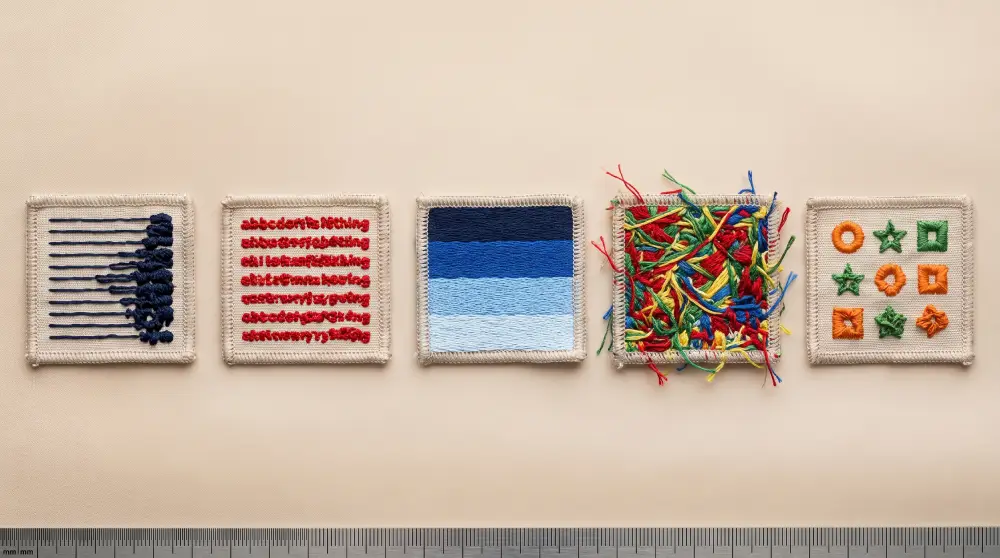
Every rejected AI patch design fails on at least one of these.
| What AI produces | What thread does | Practical limit |
| Hairline detail, 1px outlines | A stitch has physical width. Lines thinner than the thread disappear or pull into a blob | Roughly 1 mm (0.04 in) minimum line width |
| Small text | Letters below a certain height fill in. Counters in a, e, o close up | Around 1/4 in (6 mm) cap height |
| Smooth gradients | Thread does not blend. Color changes in steps, not fades | Approximated with color blocking |
| 20+ colors | Each color is a thread change, a trim, and a cost | 6 to 9 typical, 12 is a practical ceiling |
| Tiny enclosed shapes | Shapes under a few millimeters cannot hold their own outline | Merge or delete below ~3 mm |
None of this is a limitation of a particular factory. It is thread on fabric. Every patch maker hits the same wall.
The size test every AI patch design has to pass
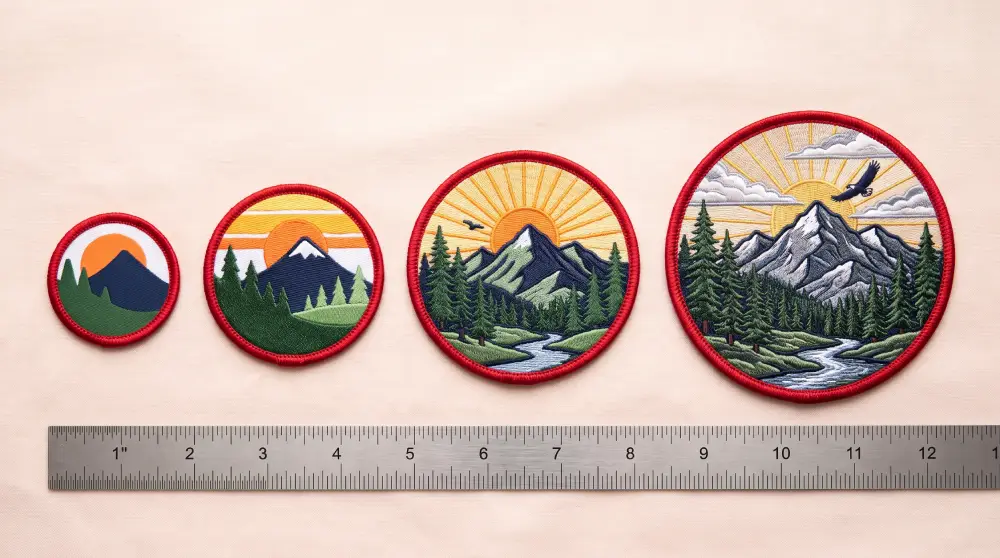
Most AI patch designs are judged on a screen at 1000 pixels. They get ordered at 2.5 inches. That is where the trouble starts.
| Finished size | What survives | What to cut |
| 2 in | Bold shapes, 1 or 2 words, 4 to 6 colors | All fine detail, small text, gradients |
| 3 in | Medium detail, a short tagline, 6 to 8 colors | Hairlines, tiny icons |
| 4 to 5 in | Most illustration detail, readable body text | Only the thinnest lines |
| 6 in and up | Nearly everything in the original | Very little |
Before you do anything else, print your design at the actual finished size on plain paper and hold it at arm’s length. If you cannot read the text or make out the small shapes on paper, thread will not save them.
That one test resolves most of these conversations before they start.
Four routes when your design does not fit
Plenty of guides give one answer here. There are four, and the right one depends on what you actually care about.
1. Simplify and keep embroidery
Drop the color count, thicken the lines, remove or enlarge the text. For logos and bold graphics, this usually improves the patch. Embroidery has a raised, textured surface that reads well from a distance, and a clean design uses that instead of fighting it. Embroidered patches remain the default for a reason.
2. Switch to woven
Woven patches use much finer threads than embroidery, so they hold smaller text and tighter detail at the same size. The surface is flat rather than raised. If your AI design depends on detail you cannot bear to lose, woven is usually the closest match to what you saw on screen.
3. Go printed
If your artwork is photographic, full of gradients, or uses dozens of colors, printing handles all of it. No color limit, no detail limit. The trade-off is texture: a printed patch is smooth, and it does not have the handmade quality buyers associate with a patch.
4. Use PVC
Rubber PVC holds crisp edges and fine shapes, and it is waterproof. Color count is limited, and the look is modern rather than traditional. PVC works well for logos with clean geometry and poorly for anything painterly.
Being straight about it: some AI designs cannot be made at 2 inches by any method. A detailed illustrated scene with forty colors and shading is a picture, not a patch. In that case, the honest options are to go bigger or to redesign.
Preparing your AI file before you send it
You can save a round of back-and-forth by doing this first.
- Export at the largest size your tool allows. A 4000px PNG gives the digitizer more to work with than a 1024px one
- Send the original, not a screenshot. Screenshots add compression and lose edge definition
- Count your colors. Open the image and genuinely count them. If you are past 10, decide now which ones matter
- Flatten the background. AI tools often add atmospheric haze behind the subject. It cannot be stitched, and it confuses the outline
- Write down the finished size in inches, and where the patch will sit
- Say what must survive. If the text matters more than the illustration, say so. That changes every decision downstream
If you want to try vectorizing it yourself first, Adobe’s raster and vector comparison explains the difference and covers converting an image with Image Trace. A clean vector helps. It does not replace digitizing, which is a separate step.
What happens after you send it
Patches Studio digitizes in-house, which matters more here than on an ordinary order.
Someone opens your file and rebuilds it as stitch objects: outlines, fills, satin columns, underlay, stitch direction for each area. On an AI design, this usually means decisions you did not make, like which two of your five blues to merge and whether a shadow becomes a color block or disappears.
You get a proof before anything runs. Check the text size on it, not the overall look. Text is what fails most often, and it is the easiest thing to fix at proof stage.
Production runs 10 to 17 business days after you approve, with free shipping across the USA. Larger runs are priced through bulk ordering.
Find out what your AI design will actually look like
Send us the file and the size you want, and we will show you a proof before you spend anything. If your design needs a different patch type to work, Patches Studio will tell you which one and why, not after you have paid. Most quotes come back the same day.
Get a quote on your custom patches →
Frequently Asked Questions
Can you embroider an AI-generated image?
Often yes, with changes. The image has to be rebuilt as a stitch file regardless of where it came from, and during that rebuild, anything thread cannot physically produce gets simplified or removed. Bold designs with a handful of colors come through nearly unchanged. Detailed illustrations with gradients need real editing first.
Why does my AI patch design look worse as a patch?
Four reasons, usually together:
Lines thinner than the thread cannot be stitched
Text below about 1/4 inch fills in and stops being readable
Gradients become visible color steps because thread does not blend
The screen version was viewed at 10 times the finished size
What file should I send from an AI patch design generator?
Send the highest-resolution PNG the tool gives you, and the original rather than a screenshot. If you have converted it to vector yourself, send both the vector and the original image so the digitizer can check what was lost in conversion.
Which AI tool gives the best file for a patch?
Adobe Firefly, because Illustrator’s Text to Vector produces an editable SVG rather than a flat image. ChatGPT, Gemini, and Midjourney all output PNG, which has to be traced into vector first and loses accuracy in that step. If you are starting a patch design from scratch, beginning in vector saves a round of cleanup. It does not remove the digitizing step, which is separate and happens on our side either way.
How many colors can a patch have?
Most patches use 6 to 9 thread colors. Twelve is workable, but each additional color means another thread change, which adds time and cost. Printed patches have no color limit at all, so a design that genuinely needs 30 colors should be printed rather than stitched.
Is woven always better than embroidered for AI designs?
No. Woven holds finer detail, which helps when your design depends on small elements. Embroidery has a raised texture and reads better from a distance, which suits bold logos and anything going on the back of a jacket. Pick based on what your design needs, not on which one sounds more advanced.
What is the smallest text which you can embroider?
Roughly 1/4 inch (6 mm) cap height for clean, readable letters in a simple typeface. Below that, the enclosed spaces in letters like a, e, and o start closing up. Woven handles smaller text than embroidery. Printed handles smaller still.
Can I just use an AI patch designer and skip the manufacturer’s proof?
Not advisable. An AI patch designer produces a picture, and no generator currently outputs a machine-ready stitch file. The proof is where you catch the gap between the two, and it costs nothing to review.
My design has a photo in it. What are my options?
A printed or sublimated patch gives you the photo as it is
Woven can approximate it at larger sizes with reduced colors
Embroidered will not reproduce a photograph in any useful way
Will you tell me if my design will not work?
Yes, before you pay for production rather than after. If something cannot be stitched at your requested size, we say so and suggest an alternative, including recommending a different patch type than the one you asked for.
Does making the patch bigger fix everything?
It fixes most detail problems, since every limit above is relative to finished size. A design that fails at 2 inches often works at 4. The catch is placement: a 5-inch patch does not fit on a chest or a cap, so you gain detail and lose where you can put it.
How long does the whole process take?
Allow roughly three weeks from first contact to delivery. Digitizing and proofing take a few days at the front, then production runs 10 to 17 business days after you approve the proof.
Can you fix my design, or do I need a designer?
For most AI artwork, Patches Studio simplifies it during digitizing at no extra charge and shows you the result on the proof. If your design needs genuine redrawing, such as redesigning a layout or replacing illegible text, that is design work, and we will tell you upfront rather than quietly flattening your design.